
![Google Merchant Center Products Expiring Using Shopify [Solution]](https://feedarmy.com/wp-content/uploads/2019/02/Google-Merchant-Center-Products-Expiring-Using-Shopify.jpg)
When using Shopify you might notice that products expire. This is because products need to be submitted every 30 days.
There seems to be an issue with the Content API used by the Google Shopping app within Shopify. And both parties will tell you to contact the other party to resolve, forcing you in an endless loop.
Solution 1
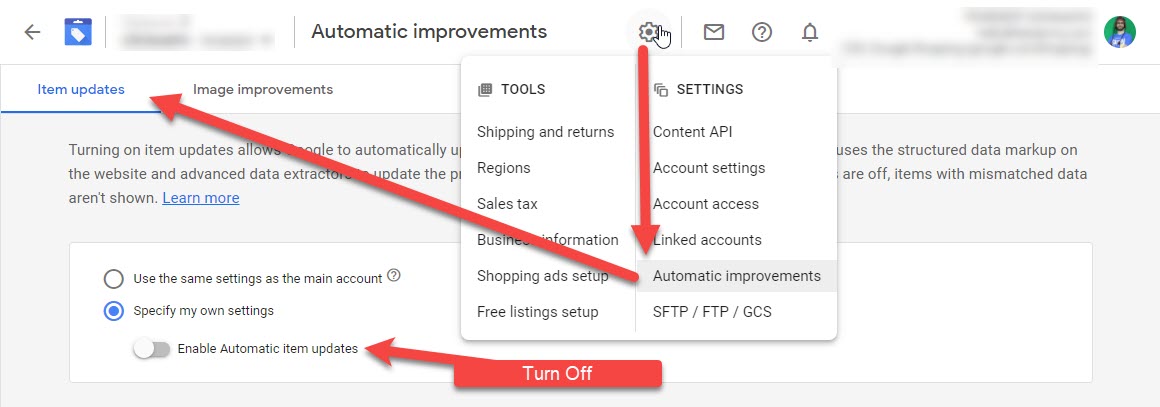
According to Shopify support you need to disable automatic price and availability updates.
- Go to Google Merchant Center
- Top right corner, click on the gear icon
- Select Automatic Improvements
- Click on the tab Item updates
- Disable automatic item updates
- Contact Shopify to force a manual update for all products
Solution 2
Go to the specific product that has expired in Google Merchant Center and edit the details in Shopify, like the title, description, etc. this will then force Shopify to post this new data to Google Merchant Center. Your products are now active for another 30 days.
Solution 3
You can reprocess the data feed if you are using content API, which can resolve the issue in half an hour.
Solution 4
Using a data feed that updates every day for all products. Such as using a text delimited or XML data feed.
For my clients, I use datafeedwatch (you get 15 days free trial + 1 month free with my referral link), which allows you to set a daily fetch, which means your products will never expire. You can also set Google Merchant Center to collect the product info every week.
i read supplemental feeds can help as well from your blog. but those will be partial updates right? can you explain how that will help?
You’re right that supplemental feeds are considered partial updates, but it’s a bit more nuanced. Essentially, any attribute included in the supplemental feed will override or update the corresponding attribute in the main feed—so it’s only “partial” depending on how it’s used.
In my case, I primarily use supplemental feeds to refine and optimize product data for better performance. For instance, a product title that performs well on a website might not be as effective in a Shopping ad. Supplemental feeds allow me to tailor and enhance that data specifically for Google, helping to improve visibility and rankings.
no sir. i meant in the context of expiring products. i guess those wont help right? read on the developer google page that supplemental feeds cannot help to reset expiration date attribute. just wanted to confirm that.
Historically, the supplemental feed has resolved this issue. However, since I don’t use this technique often, I did notice one instance a few months ago where it didn’t work as expected. It’s possible that Google may have limited or disabled this functionality within the last year, though I can’t confirm that with certainty. I’d recommend testing it—if it doesn’t work, at least you’ll know for sure. So if it fails, make sure the primary feed is updated daily to avoid this.
okay. thank you sir for responding. your suggestion is valuable
What if my whole Content API was deleted? I can’t get it back even after reinstalling Google sales channel.
When you reinstall an app, it may take up to half an hour before you see it in Google Merchant Center.