


Google has reintroduced a long-missed feature in Google Merchant Center (GMC) — the historical status graph — and it’s now much easier to access.
Previously, to view the historical status of your products (such as spikes in disapprovals or limited visibility), you had to go through:
Google Merchant Center > Products > Needs Attention > View History
That method still works, but as of June 2025, the historical graph is once again visible directly from the Products page, similar to how it worked in the classic GMC interface.

New & Easier Way to View Historical Status


To access the status graph from the product page:
- Go to Google Merchant Center > Products
- In the center, you will now see a status graph showing:
- Approved
- Limited
- Disapproved
- Under Review
- You can view data for the last 30 or 90 days, helping you spot trends and pinpoint when product issues began.
This is extremely helpful if you’re trying to understand why a product stopped receiving impressions or whether recent feed changes had a negative impact.
Old Method Still Available

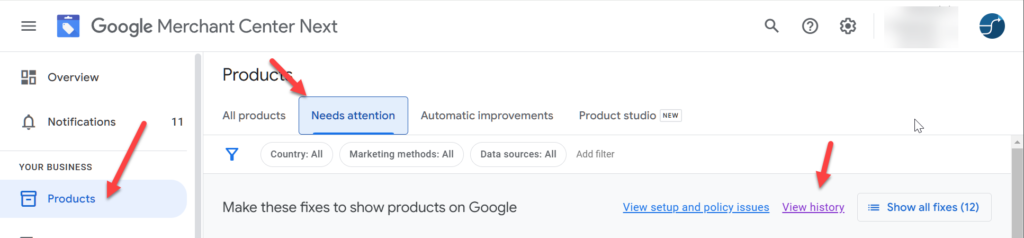
You can still use the original method:
Google Merchant Center > Products > Needs Attention > View History
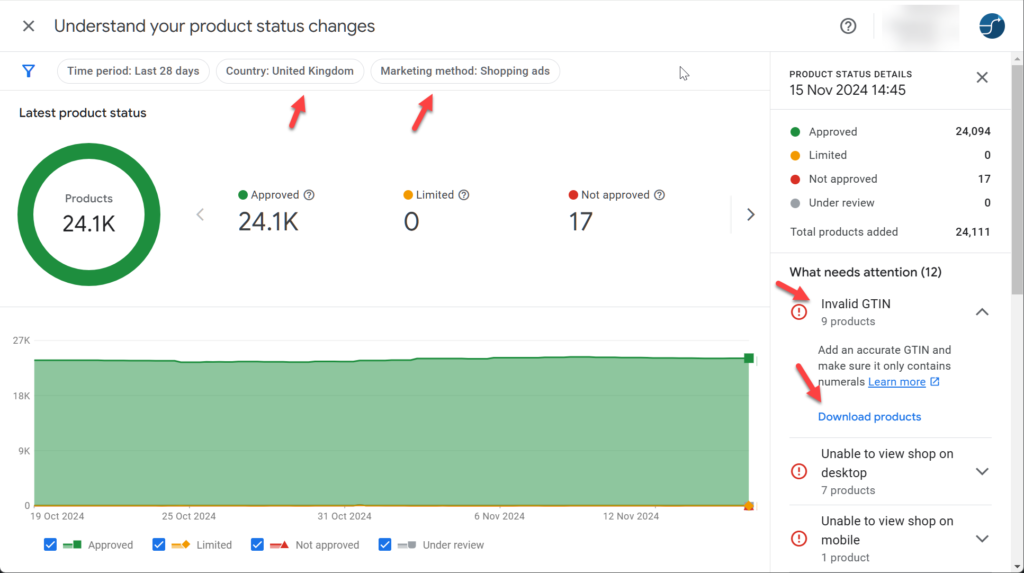
This view remains useful because it:
- Lists specific issue types with counts over time
- Allows you to download issues by country and marketing method
- Surfaces problems that may not always appear on the main product page
However, some discrepancies still exist — for example, certain disapprovals may appear in the history tab but not on the product overview. So it’s good practice to check both views.
Pro Tip: Use This to Track Optimizations
If you’re updating product data (e.g. improving titles, images, or pricing), use the historical graph to measure before-and-after results. For example:
- If disapprovals spike after a change, revert it.
- If impressions increase, you’ll know your edits are working.
This allows you to verify changes with evidence — an essential technique when managing large feeds or working with clients.
This change was first found by Yoann Ferrand
Conclusion:
With this update, Google has made it easier to monitor product statuses and diagnose issues without digging deep into menus. Be sure to check both the new product page graph and the Needs Attention > View History tab for a complete picture of your account health.